♪³ 在ros2中检查:
根据步骤来:
♪⁶ 0.安装ros2,使用鱼香ROS一键安装
bash1wget http://fishros.com/install -O fishros && . fishros2
♪⁶ 1.创建ros2工作空间:
创建目录:
bash1mkdir ~/ros2_ws_robotarm # 创建工作空间,名字随意2mkdir -p ros2_ws_robotarm/src3
编译初始化一下:
bash1cd ~/ros2_ws_robotarm2colcon build3
这样就会在这个工作空间下自动生成build、install、log等文件夹;
♪⁶ 2.移植SolidWorks的导出的ros包并修改相关配置
将SolidWorks的导出的ros包移动到src文件夹下,即如下目录结构:
bash1├── ros2_ws_robotarm2│ ├── build3│ ├── install4│ ├── log5│ └── src6│ └── robotarm7
因为SolidWorks导出的默认是ros1的包,因此在ros2环境下,需要修改一些配置
分别需要修改CMakeLists.txt、package.xml两个文件,以及在launch目录下,将.launch文件都改成.launch.py文件,然后创建rviz/urdf.rviz,下面进行详细说明:
(1)修改CMakeLists.txt为以下内容,其中第2行改为自己的包名:
CMake1cmake_minimum_required(VERSION 3.5)2project(robotarm)3if(NOT CMAKE_C_STANDARD)4 set(CMAKE_C_STANDARD 99)5endif()67if(NOT CMAKE_CXX_STANDARD)8 set(CMAKE_CXX_STANDARD 14)9endif()1011if(CMAKE_COMPILER_IS_GNUCXX OR CMAKE_CXX_COMPILER_ID MATCHES "Clang")12 add_compile_options(-Wall -Wextra -Wpedantic)13endif()1415find_package(ament_cmake REQUIRED)1617if(BUILD_TESTING)18 find_package(ament_lint_auto REQUIRED)19 ament_lint_auto_find_test_dependencies()20endif()2122install(DIRECTORY23 meshes urdf textures config launch rviz24 DESTINATION share/${PROJECT_NAME}/25)26ament_package()27
(2)修改package.xml文件,同样,其中第3行根据自己包名修改:
xml1<?xml version="1.0"?>2<package format="3">3 <name>robotarm</name>4 <version>0.1.0</version>5 <description>wangeden's robot arm description package</description>6 <maintainer email="wangedenx@outlook.com">cxy</maintainer>7 <license>BSD</license>8 <buildtool_depend>ament_cmake</buildtool_depend>9 <test_depend>ament_lint_auto</test_depend>10 <test_depend>ament_lint_common</test_depend>11 <exec_depend>joint_state_publisher</exec_depend>12 <exec_depend>joint_state_publisher_gui</exec_depend>13 <exec_depend>robot_state_publisher</exec_depend>14 <exec_depend>rviz2</exec_depend>15 <exec_depend>xacro</exec_depend>16 <export>17 <build_type>ament_cmake</build_type>18 </export>19</package>20
(3)将launch目录下的display.launch和gezebo.launch修改为display.launch.py和gezebo.launch.py,然后修改内容:
display.launch.py修改为如下内容,第12行改为自己包名,第37行改为自己的urdf文件名;
python1import os2from ament_index_python.packages import get_package_share_directory3from launch import LaunchDescription4from launch.actions import DeclareLaunchArgument, ExecuteProcess, IncludeLaunchDescription5from launch.conditions import IfCondition6from launch.launch_description_sources import PythonLaunchDescriptionSource7from launch.substitutions import LaunchConfiguration, PythonExpression8from launch_ros.actions import Node9def generate_launch_description():10 # Get the launch directory11 bringup_dir = get_package_share_directory('robotarm')12 launch_dir = os.path.join(bringup_dir, 'launch')13 # Launch configuration variables specific to simulation14 rviz_config_file = LaunchConfiguration('rviz_config_file')15 use_robot_state_pub = LaunchConfiguration('use_robot_state_pub')16 use_joint_state_pub = LaunchConfiguration('use_joint_state_pub')17 use_rviz = LaunchConfiguration('use_rviz')18 urdf_file= LaunchConfiguration('urdf_file')19 declare_rviz_config_file_cmd = DeclareLaunchArgument(20 'rviz_config_file',21 default_value=os.path.join(bringup_dir, 'rviz', 'urdf.rviz'),22 description='Full path to the RVIZ config file to use')23 declare_use_robot_state_pub_cmd = DeclareLaunchArgument(24 'use_robot_state_pub',25 default_value='True',26 description='Whether to start the robot state publisher')27 declare_use_joint_state_pub_cmd = DeclareLaunchArgument(28 'use_joint_state_pub',29 default_value='True',30 description='Whether to start the joint state publisher')31 declare_use_rviz_cmd = DeclareLaunchArgument(32 'use_rviz',33 default_value='True',34 description='Whether to start RVIZ')35 declare_urdf_cmd = DeclareLaunchArgument(36 'urdf_file',37 default_value=os.path.join(bringup_dir, 'urdf', 'robotarm.urdf'),38 description='Whether to start RVIZ')39 start_robot_state_publisher_cmd = Node(40 condition=IfCondition(use_robot_state_pub),41 package='robot_state_publisher',42 executable='robot_state_publisher',43 name='robot_state_publisher',44 output='screen',45 #parameters=[{'use_sim_time': use_sim_time}],46 arguments=[urdf_file])47 start_joint_state_publisher_cmd = Node(48 condition=IfCondition(use_joint_state_pub),49 package='joint_state_publisher_gui',50 executable='joint_state_publisher_gui',51 name='joint_state_publisher_gui',52 output='screen',53 arguments=[urdf_file])54 rviz_cmd = Node(55 condition=IfCondition(use_rviz),56 package='rviz2',57 executable='rviz2',58 name='rviz2',59 arguments=['-d', rviz_config_file],60 output='screen')61 # Create the launch description and populate62 ld = LaunchDescription()63 # Declare the launch options64 ld.add_action(declare_rviz_config_file_cmd)65 ld.add_action(declare_urdf_cmd)66 ld.add_action(declare_use_robot_state_pub_cmd)67 ld.add_action(declare_use_joint_state_pub_cmd)68 ld.add_action(declare_use_rviz_cmd)69 # Add any conditioned actions70 ld.add_action(start_joint_state_publisher_cmd)71 ld.add_action(start_robot_state_publisher_cmd)72 ld.add_action(rviz_cmd)73 return ld74
gezebo.launch.py修改为如下内容,第10行改为自己包名,第21行改为自己的urdf文件名;
python1from launch import LaunchDescription2from launch_ros.actions import Node3from ament_index_python.packages import get_package_share_directory4from launch.actions import IncludeLaunchDescription5from launch.launch_description_sources import PythonLaunchDescriptionSource6import os78def generate_launch_description():9 # 获取当前包路径10 robot_package_dir = get_package_share_directory('robotarm')1112 # 启动 Gazebo 空世界13 gazebo_ros_package_dir = get_package_share_directory('gazebo_ros')14 empty_world_launch = IncludeLaunchDescription(15 PythonLaunchDescriptionSource(16 os.path.join(gazebo_ros_package_dir, 'launch', 'empty_world.launch.py')17 )18 )1920 # 加载 URDF 文件路径(需要提前用 xacro 生成)21 urdf_file_path = os.path.join(robot_package_dir, 'urdf', 'robotarm.urdf')2223 # 启动 Gazebo 模型生成器节点24 spawn_entity_node = Node(25 package='gazebo_ros',26 executable='spawn_entity.py',27 name='spawn_model',28 arguments=[29 '-entity', 'robot',30 '-file', urdf_file_path,31 '-topic', 'robot_description'32 ],33 output='screen'34 )3536 # 静态 TF 发布器:base_link -> base_footprint37 tf_footprint_base_node = Node(38 package='tf2_ros',39 executable='static_transform_publisher',40 name='tf_footprint_base',41 arguments=['0', '0', '0', '0', '0', '0', 'base_link', 'base_footprint']42 )4344 return LaunchDescription([45 empty_world_launch,46 spawn_entity_node,47 tf_footprint_base_node48 ])49
(4)创建rviz/urdf.rviz,并填写一下内容:
rviz1Panels:2 - Class: rviz_common/Displays3 Name: Displays4 - Class: rviz_common/Views5 Name: Views6Visualization Manager:7 Class: ""8 Displays:9 - Class: rviz_default_plugins/Grid10 Name: Grid11 Value: true12 - Alpha: 0.813 Class: rviz_default_plugins/RobotModel14 Description Source: Topic15 Description Topic:16 Value: /robot_description17 Enabled: true18 Name: RobotModel19 Value: true20 - Class: rviz_default_plugins/TF21 Name: TF22 Value: true23 Global Options:24 Fixed Frame: base_link25 Frame Rate: 3026 Name: root27 Tools:28 - Class: rviz_default_plugins/MoveCamera29 Value: true30 Views:31 Current:32 Class: rviz_default_plugins/Orbit33 Distance: 1.734 Name: Current View35 Pitch: 0.3336 Value: Orbit (rviz)37 Yaw: 5.538Window Geometry:39 Height: 80040 Width: 120041
♪⁶ 3.编译运行
然后会到工作空间目录,重新进行编译:
bash1cd ~/ros2_ws_robotarm2colcon build3
source一下环境,然后就能运行了:
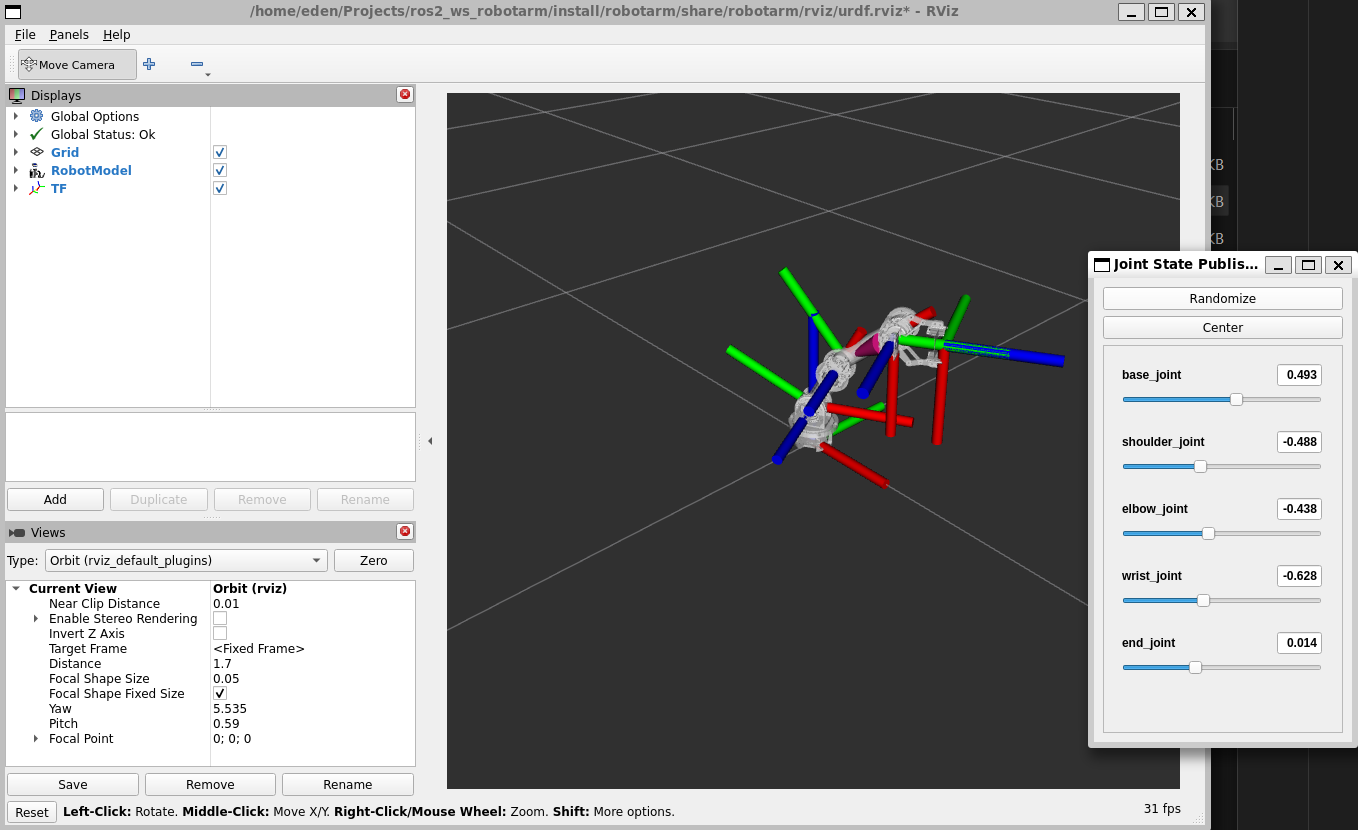
bash1source /opt/ros/humble/setup.bash2source ~/ros2_ws_robotarm/install/setup.bash3ros2 launch robotarm display.launch.py4
效果如下: